

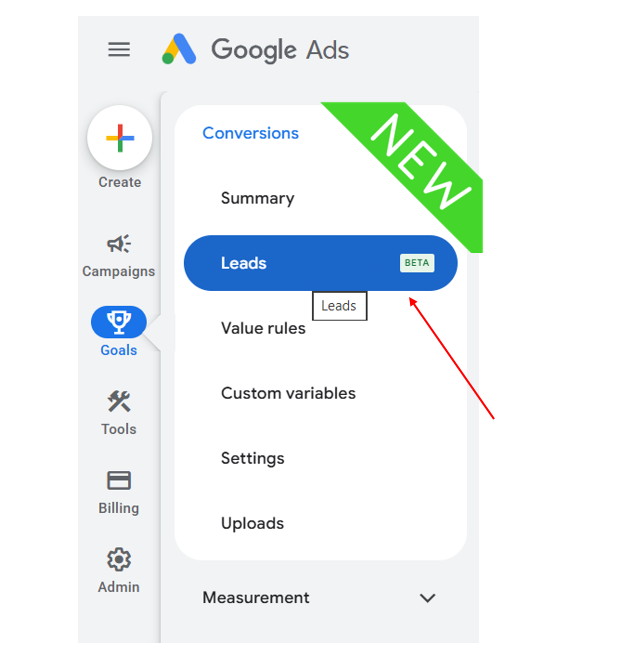
Google Ads has started rolling out a new Leads (Beta) section under the Goals → Conversions menu. Instead of managing all conversion actions in one place, Google is creating a dedicated workspace specifically for businesses focused on lead generation.
Although the feature is still in beta and may not be available in every account, it signals Google’s continued effort to simplify conversion management for advertisers who generate leads rather than direct online sales.
If your business relies on form submissions, phone calls, appointment bookings, or quote requests, this update is worth watching.
What’s New?
From the screenshot, a new Leads (Beta) option now appears under:
Goals → Conversions
It sits alongside existing options such as:
- Summary
- Value Rules
- Custom Variables
- Settings
- Uploads
This suggests Google is separating lead-focused conversion management from general conversion settings.
Note: Because the feature is in beta, Google may change its interface and functionality before the full rollout.
Why Is Google Introducing a Separate Leads Section?
Lead generation campaigns often require different measurement methods than ecommerce campaigns.
For example:
- A user submits a contact form.
- Someone calls your business from an ad.
- A visitor books a consultation.
- A customer requests a product demo.
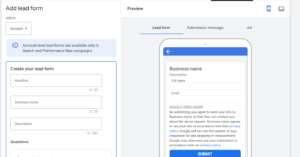
Unlike online purchases, these conversions usually continue offline through sales calls or CRM systems.
By introducing a dedicated Leads workspace, Google appears to be making these workflows easier to manage.
What You Can Expect
While Google hasn’t published complete documentation for this beta yet, the new section is likely to help advertisers manage lead-generation activities more efficiently.
Potential capabilities include:
Better Lead Conversion Management
Instead of searching through dozens of conversion actions, marketers may have one centralized location for lead-specific conversions.
Examples include:
- Contact forms
- Phone calls
- Appointment bookings
- Demo requests
- Quote requests
- Newsletter sign-ups
Easier Offline Conversion Tracking
Many businesses close deals after speaking with prospects offline.
A dedicated Leads section could simplify:
- CRM integrations
- Qualified lead imports
- Offline conversion uploads
- Lead status updates
This would help advertisers measure not just leads—but which leads become paying customers.
Improved Lead Quality Measurement
Google has been investing heavily in measuring lead quality instead of lead quantity.
Features like:
- Enhanced Conversions for Leads
- Offline Conversion Import
- Smart Bidding optimization
all rely on sending higher-quality conversion data back to Google Ads.
The new Leads workspace may become the central hub for these features.
Better Organization
Large Google Ads accounts often contain dozens or even hundreds of conversion actions.
Separating lead conversions from purchase conversions makes campaign management easier for:
- Marketing agencies
- Enterprise advertisers
- B2B companies
- Service businesses
Who Should Use It?
The new feature is particularly useful for businesses that generate leads instead of immediate online sales.
Examples include:
- Digital marketing agencies
- SaaS companies
- Real estate businesses
- Law firms
- Healthcare providers
- Financial services
- Education providers
- Home service companies
- Consultants
If your primary goal is collecting leads rather than processing online transactions, this update could become an important part of your advertising workflow.
Benefits for Advertisers
Some expected advantages include:
- Cleaner conversion management
- Better lead tracking
- Improved Smart Bidding signals
- Easier CRM integration
- More accurate reporting
- Better optimization for qualified leads
- Simplified campaign setup
As Google continues to invest in AI-powered bidding, providing better lead data becomes increasingly important.
Is It Available to Everyone?
Not yet.
The Leads (Beta) menu appears to be rolling out gradually.
If you don’t see it in your account:
- Your account may not be included in the beta yet.
- Google could be testing the feature with selected advertisers.
- Availability may expand over the coming months.
Should You Start Using It?
If the feature is available in your account, it’s worth exploring.
However:
- Avoid making major workflow changes until Google publishes official documentation.
- Continue following your existing conversion tracking setup.
- Monitor Google’s release notes for new capabilities.
Since the feature is still labeled Beta, changes are expected before its public release.
Best Practices
To prepare for this update:
- Audit your existing lead conversion actions.
- Ensure Enhanced Conversions are enabled where appropriate.
- Connect your CRM with Google Ads if possible.
- Import qualified offline conversions.
- Regularly review lead quality—not just lead volume.
- Keep conversion names organized and consistent.
Key Takeaways
- Google Ads is rolling out a new Leads (Beta) section under Goals → Conversions.
- The feature is designed to simplify lead-focused conversion management.
- It may improve workflows for CRM integration, offline conversion tracking, and Smart Bidding.
- Businesses focused on lead generation are likely to benefit the most.
- Because it’s still in beta, functionality may evolve as Google expands the rollout.
Conclusion
The introduction of Leads (Beta) reflects Google’s broader shift toward helping advertisers optimize for lead quality rather than simply generating more leads. While the feature is still in its early stages, it has the potential to make lead management more organized and better integrated with Google’s AI-driven advertising tools.
If you’re running lead generation campaigns, keep an eye on this update. As Google releases more documentation and expands availability, the new Leads workspace could become an essential part of managing and optimizing your conversion strategy.
References
- Google Ads Help Center
- Google Ads Release Notes
- Google Ads API Documentation
- Google Business Help Community